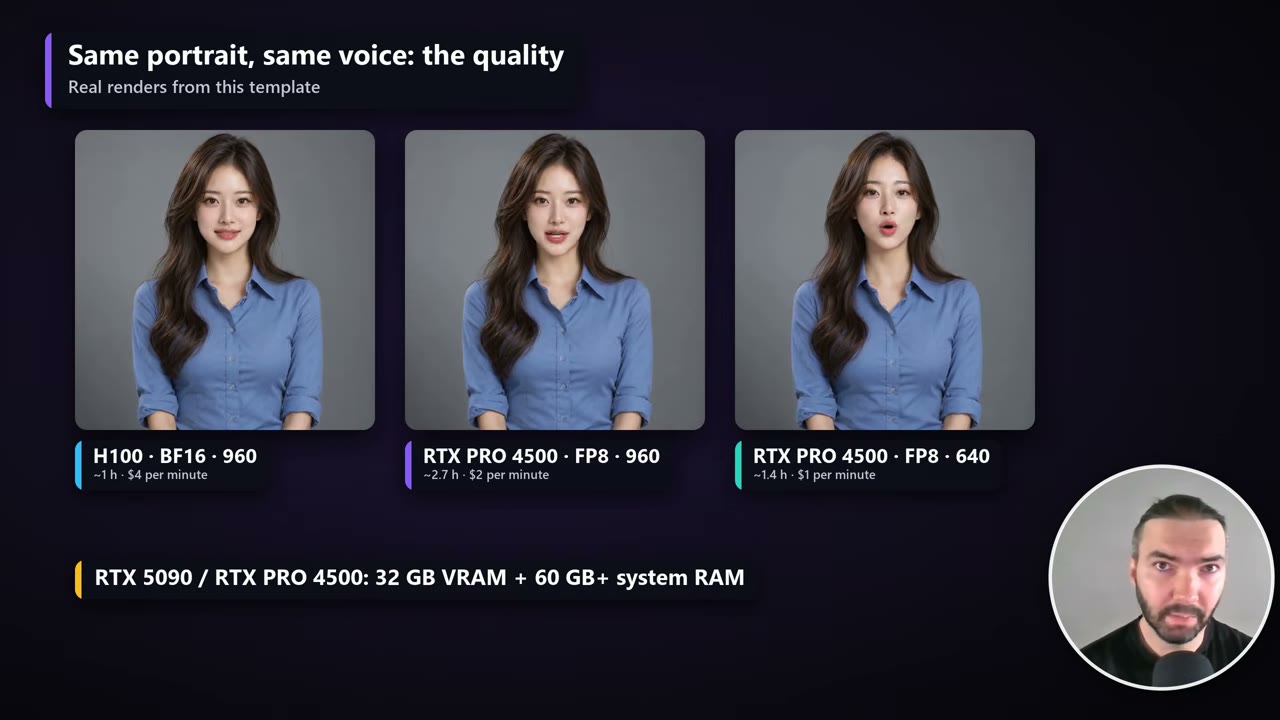
Status: Tested on RunPod. I rendered with this template on RunPod on an H100 SXM and an RTX PRO 4500. The times and costs in this guide come from those runs.
These are the highest-quality talking avatars I’ve rendered so far. LongCat-Video-Avatar 1.5 is an open-weights model from Meituan that was trained specifically on people talking, not on general video. Give it one portrait and a voiceover of any length, and it returns a lip-synced video with your original audio, including a half-body framing with hand movement.
The quality has a price: it’s a heavy model and it renders slowly. This guide covers the template I built for it, how to set it up on RunPod, which GPU to pick (system RAM matters as much as VRAM), and what a finished minute really costs.
In short
- Cost per finished minute: about $4 on an H100, $2 on an RTX PRO 4500 at 960 × 960, $1 at 640 × 640 (October 2026 prices).
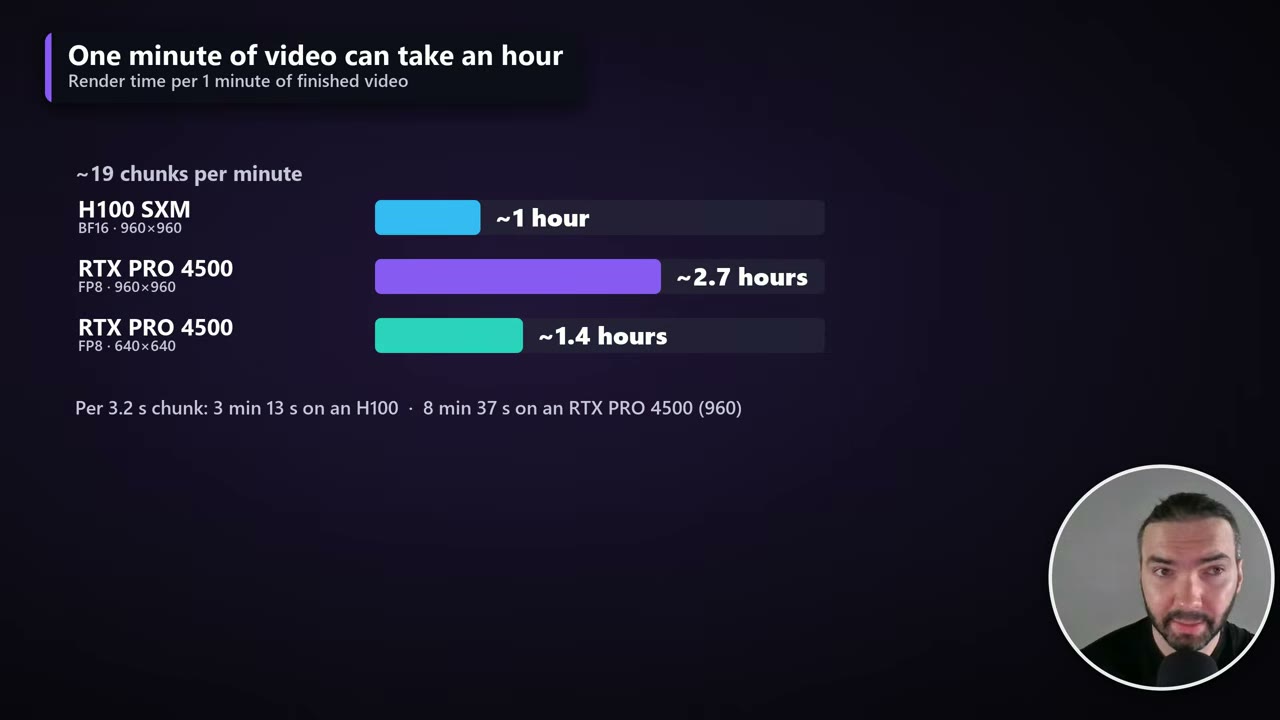
- Render time per finished minute: about 1 hour on an H100, 1.4–2.7 hours on an RTX PRO 4500.
- Hardware: at least 32 GB of VRAM and 60 GB+ of system RAM.
- How it works: 3.7-second windows, each continuing from the last, so there’s no reset at every join. A restart from the portrait every 40–60 seconds, in a pause, stops the face drifting.
- Free template on GitHub, or one click on RunPod.
What it costs
These are my measurements on RunPod in October 2026, for one minute of finished video:
| GPU | Model, canvas | Price | Render time per minute | Cost per minute |
|---|---|---|---|---|
| H100 SXM | BF16, 960 × 960 | $4.00/hr | ~1 hour | ~$4.02 |
| RTX PRO 4500 | FP8, 960 × 960 | $0.72/hr | ~2.7 hours | ~$1.97 |
| RTX PRO 4500 | FP8, 640 × 640 | $0.72/hr | ~1.4 hours | ~$1.03 |
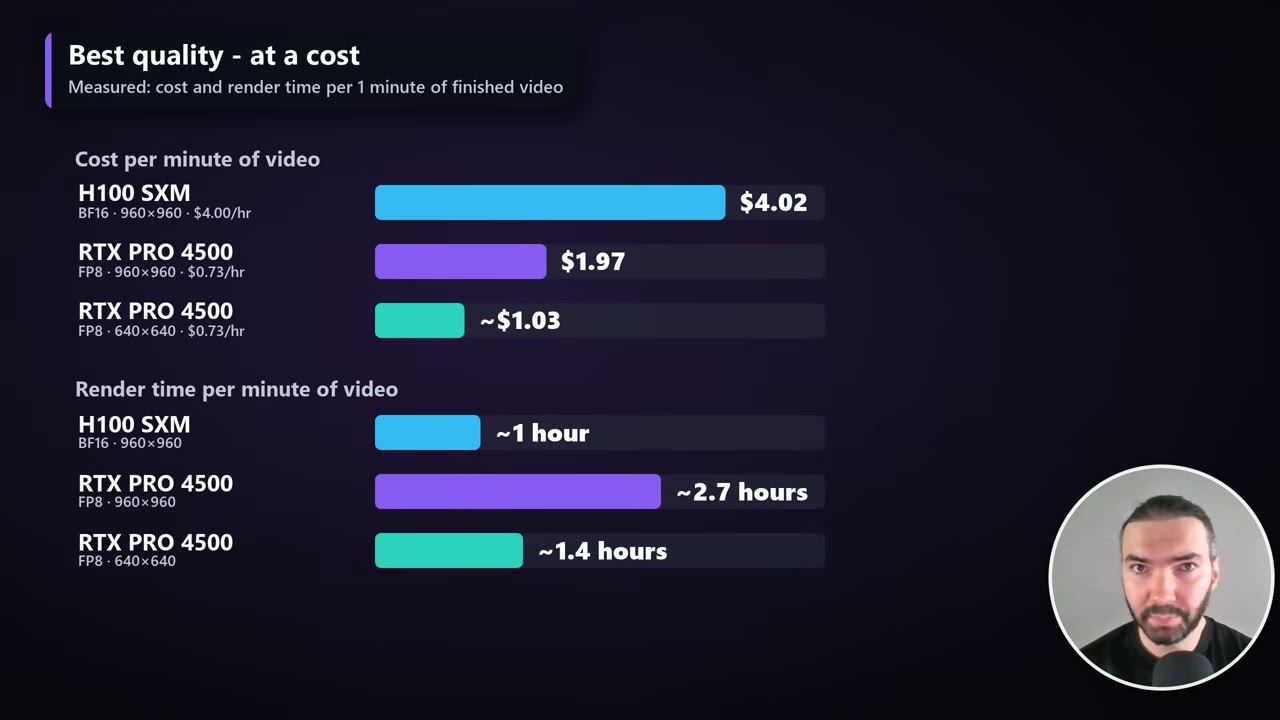
A minute of video is about 19 chunks. One 3.2-second chunk took about 3 minutes 13 seconds on the H100 and about 8 minutes 37 seconds on the RTX PRO 4500 at 960 × 960.
The quality: BF16 vs FP8, 960 vs 640
The template ships two versions of the model. BF16 is the full-precision model for 80 GB GPUs such as the H100. FP8 is a smaller copy for 32–48 GB cards such as the RTX 5090 or RTX PRO 4500. Here they are side by side:
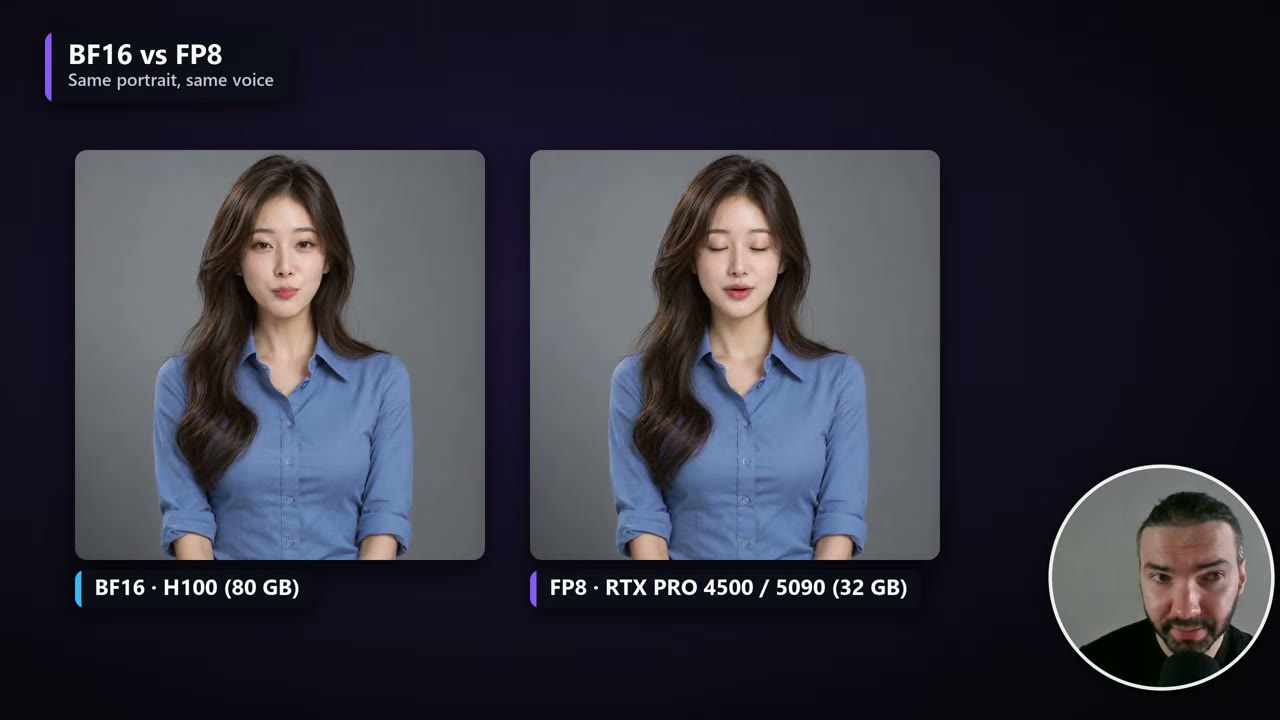
The canvas size makes a bigger difference. 960 × 960 is visibly better than 640 × 640, and much slower: whether it’s worth the extra cost is up to you.

Two ways to run it
Everything is free on GitHub: the workflows, the custom nodes and the setup script.
- On RunPod: the one-click template sets everything up. This is what the rest of the guide covers.
- Locally in ComfyUI: if you have the hardware, ask Claude (or any AI) to fetch the files from GitHub and install them in the order of
setup.sh. ComfyUI has no native LongCat nodes; the model runs through kijai’s ComfyUI-WanVideoWrapper, which the script installs at a pinned commit.
If you haven’t used RunPod before, my introduction to RunPod covers accounts, storage and pods.
Storage: Global Volume or Network Volume
RunPod now has two kinds of persistent storage, and the template works with both. I switched to a Global Volume for this one.
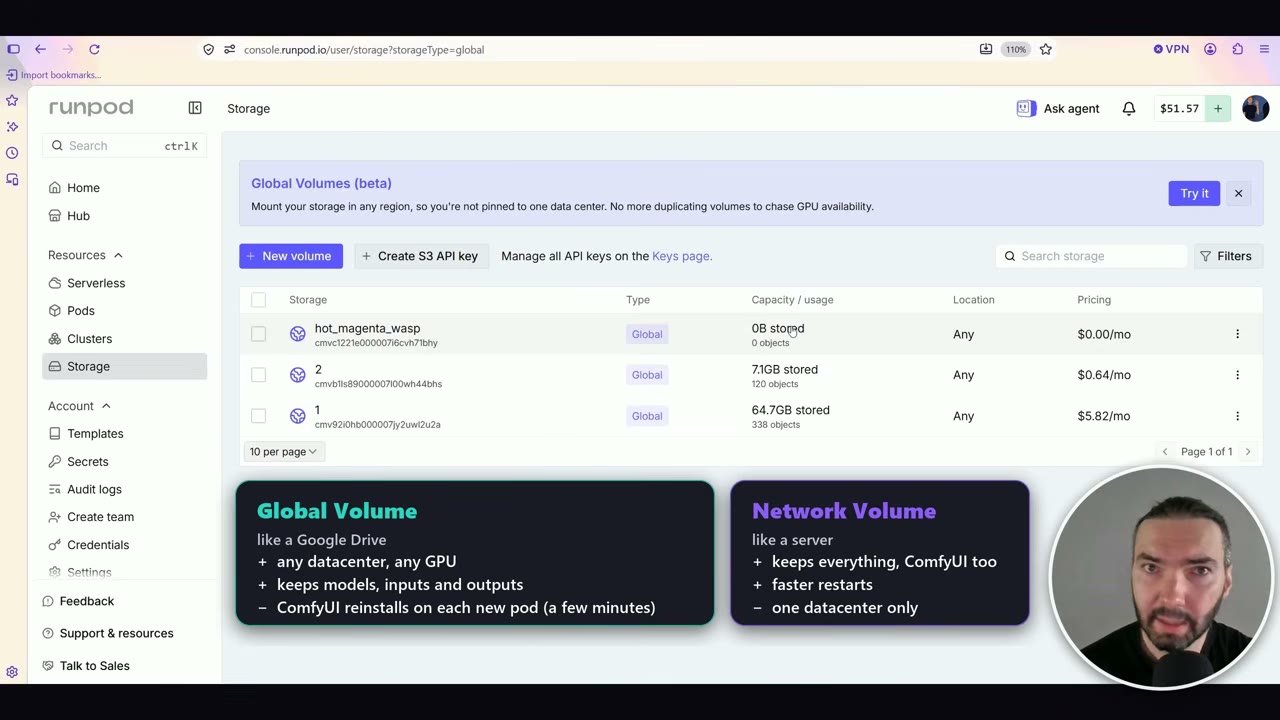
| Global Volume | Network Volume | |
|---|---|---|
| What it keeps | Models, inputs and outputs | Everything, including the ComfyUI install |
| Where you can use it | Any data center, so far more GPUs to choose from | One data center only |
| Restart time | A few extra minutes: ComfyUI is reinstalled on each new pod | Faster |
| Price (October 2026) | $0.09/GB a month, only for what’s stored | $0.07/GB a month for the size you book, empty or not |
The deciding factor for me is availability. On a Network Volume you’re tied to one data center, and that data center often has no free GPUs. A Global Volume can attach to a GPU anywhere.
It’s also cheaper for me, because you only pay for what’s actually stored, billed by the hour. My LongCat volume holds 64.7 GB, which comes to $5.82 a month. Delete it at any time and the billing stops.
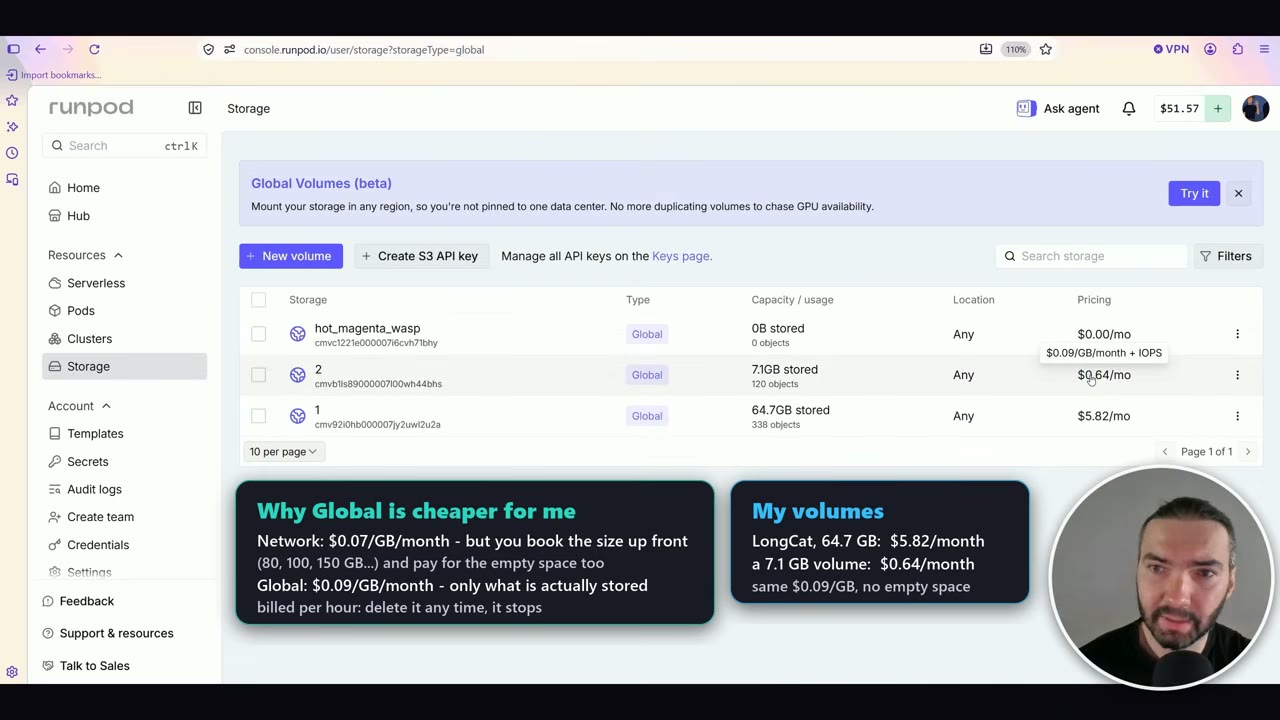
Global Volumes are still in beta. One thing from RunPod’s docs worth knowing: if your account balance reaches $0, a Global Volume is flagged and permanently deleted after 15 days.
To set it up: open the template link, go to Storage → New volume, choose Global volume, create it, then pick it and click Configure Pod with volume. The deploy page doesn’t say “Global” anywhere yet, but the volume is attached.
Which GPU: VRAM and system RAM
LongCat needs at least 32 GB of VRAM with the FP8 model, and more than 60 GB of system RAM. The RAM is the trap.
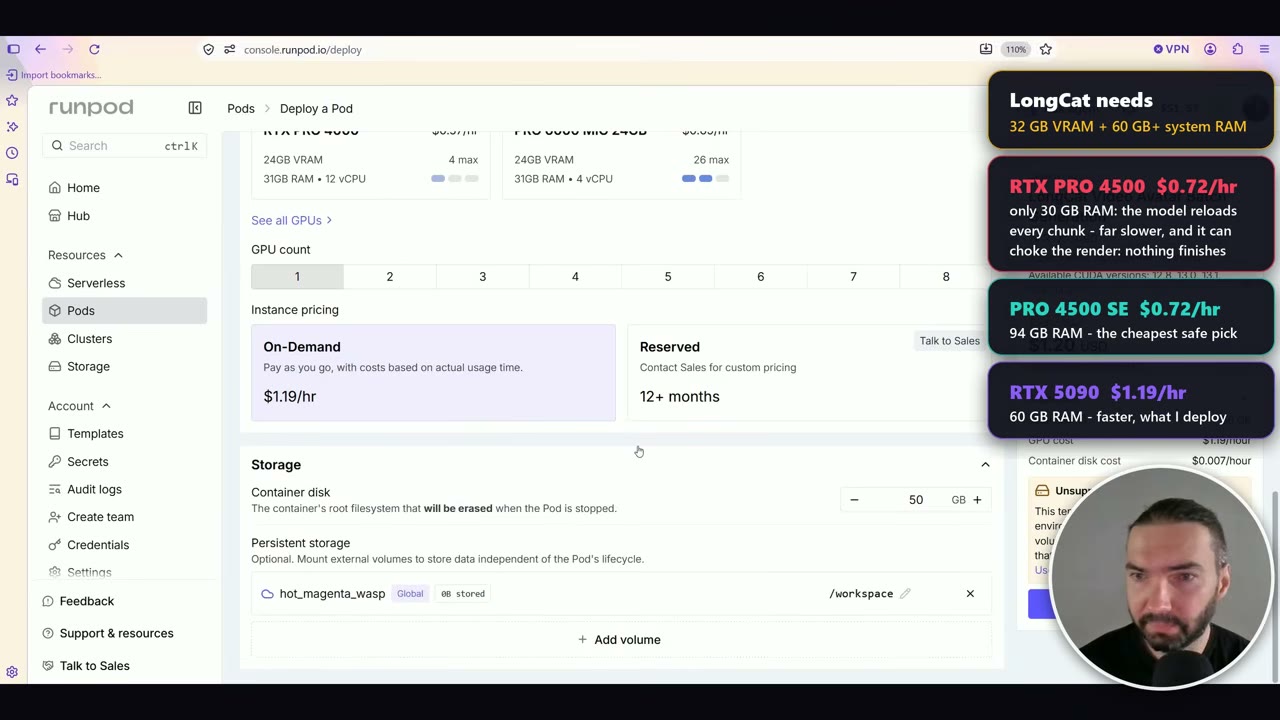
| GPU | VRAM | System RAM | Price (Oct 2026) | Notes |
|---|---|---|---|---|
| RTX PRO 4500 | 32 GB | 30 GB | $0.72/hr | Avoid: the model reloads for every chunk |
| RTX PRO 4500 SE | 32 GB | 94 GB | $0.72/hr | The cheapest safe pick |
| RTX 5090 | 32 GB | 60 GB | $1.19/hr | Faster |
| H100 SXM | 80 GB | – | $4.00/hr | Runs the full BF16 model |
With only 30 GB of RAM, the model has to be reloaded for every chunk. That makes the render far slower, and it can stall it completely.
Deploy and first boot
- Deploy the pod. You may see an “Unsupported volume type” warning on the deploy page. With this template it’s safe to ignore.
- If it says there are no resources, click Deploy again. Sometimes RunPod needs a second try.
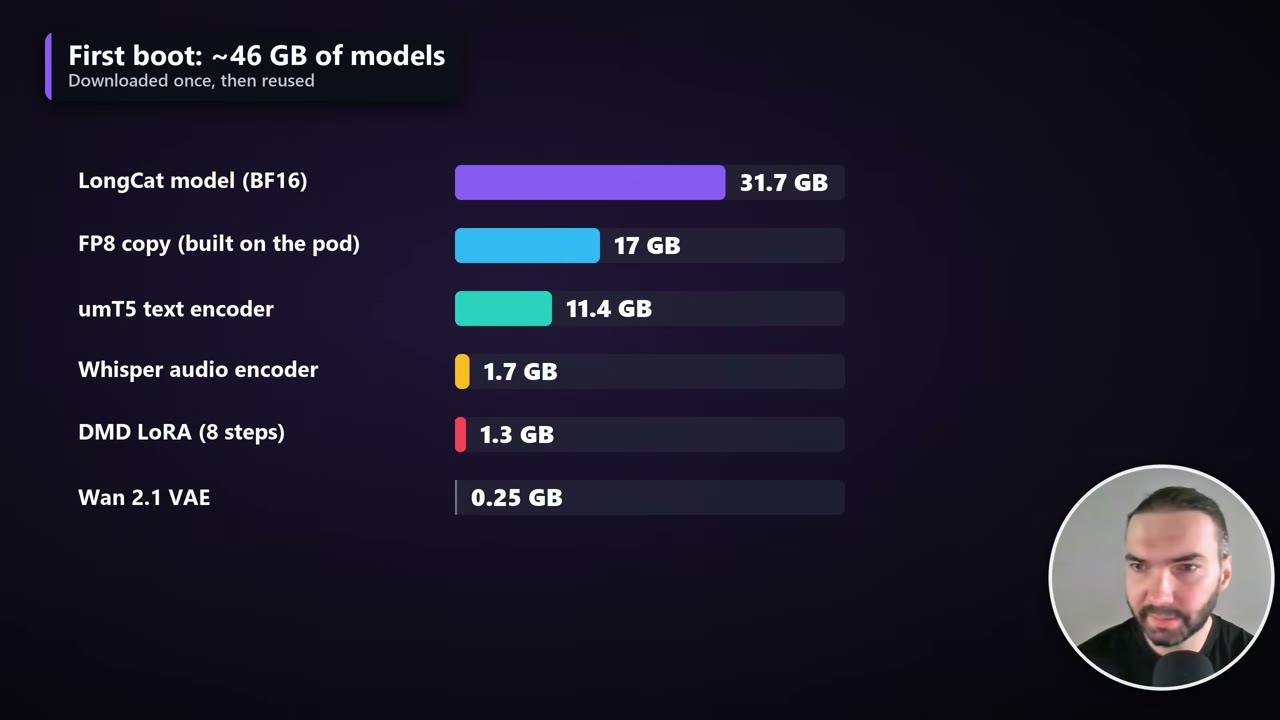
- Wait for the downloads. The first boot downloads about 46 GB of models, once. The pod also builds the FP8 copy of the model from the BF16 file, so the models take about 63 GB in total. Later boots reuse them.
- If everything downloaded but ComfyUI doesn’t start, stop the pod and start it again. It happened to me during the recording.
- Open ComfyUI and JupyterLab from the pod’s Connect menu. JupyterLab can keep saying “initializing” when it’s actually ready, so try opening it.
The workflows
Open ComfyUI, then the Workflows sidebar. There are eight workflows: BF16 or FP8, 640 × 640 or 960 × 960, and a single-voiceover or batch version of each.
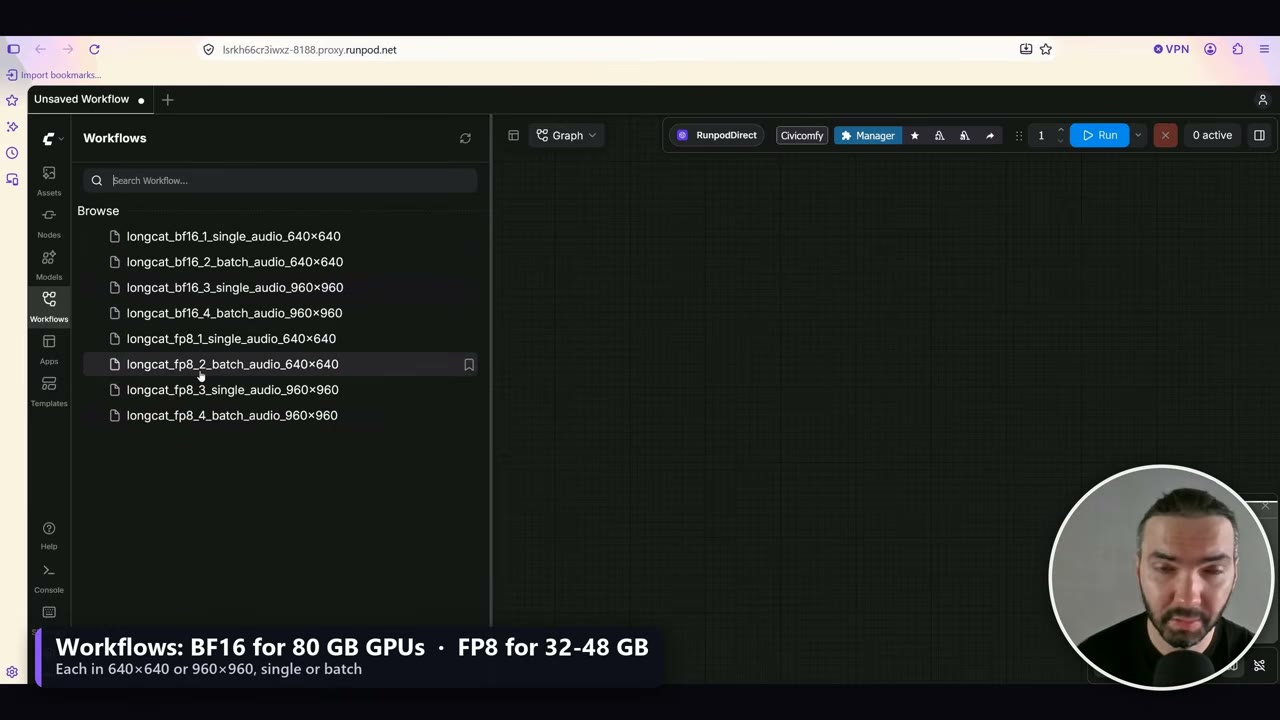
- Single audio renders one voiceover. It opens on a sample portrait and a sample voiceover of about a minute, so you can test it straight away.
- Batch audio renders every voiceover in
ComfyUI/input/batch_audio/, one video each, one after another, with the same portrait.
Upload your own portraits and voiceovers with JupyterLab: portraits into ComfyUI/input/, batch voiceovers into ComfyUI/input/batch_audio/.
The prompt is optional. For a normal talking avatar, leave it blank. You can ask for something specific, such as “natural hand movement”.
Keep the hands in the portrait
LongCat can move the hands nicely. But if the hands aren’t in your portrait, the model has to invent them when they come into frame, and it doesn’t always invent the same ones.
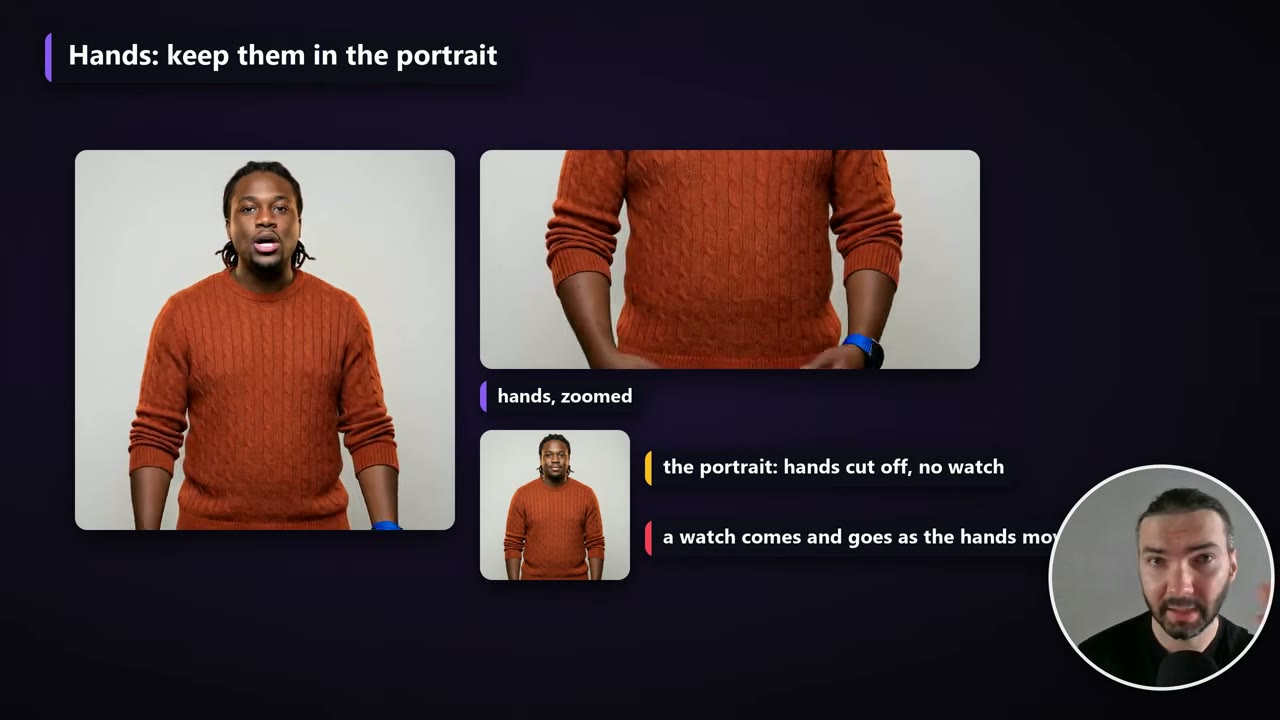
If you want hand movement, use a portrait with the hands in it, so the model knows the original hands had no watch. It’s still not a guarantee, but it lowers the risk.
How LongCat avoids drift on long videos
Every avatar model renders in chunks: none of them renders a whole minute in one go. LongCat’s windows are 3.7 seconds long, and that’s where it differs from the others.
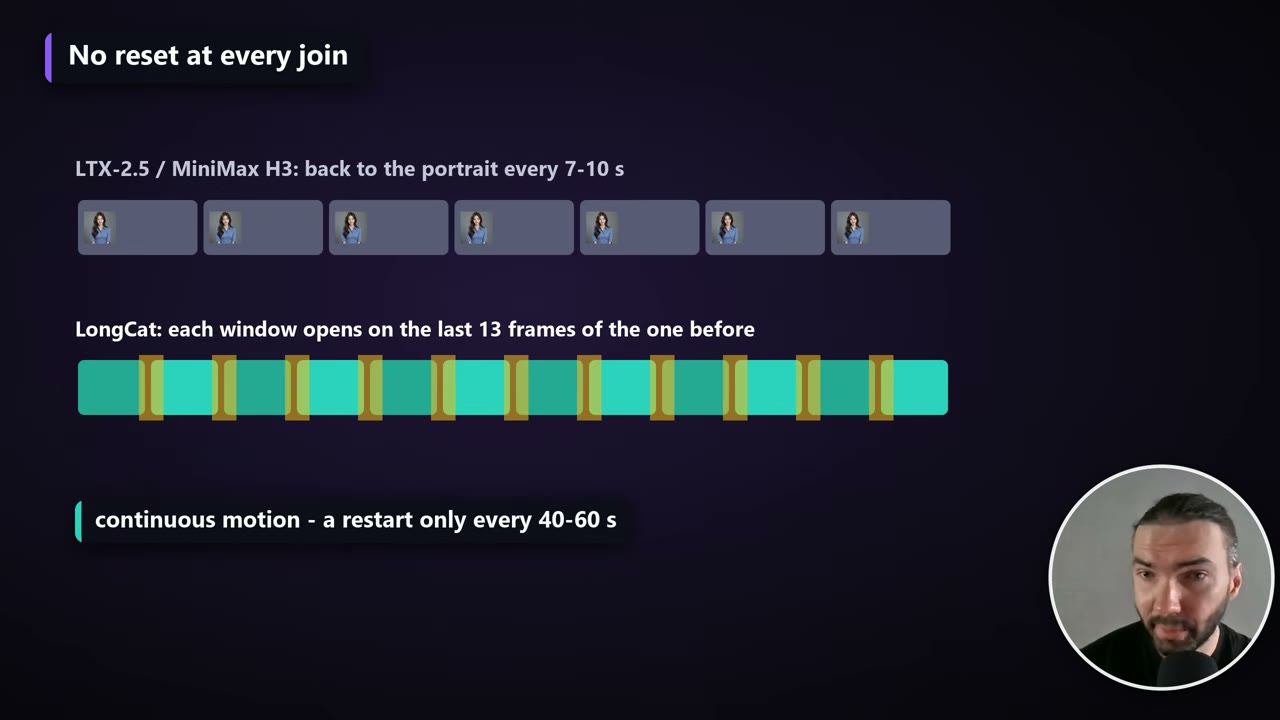
With my LTX-2.5 and MiniMax H3 templates, every chunk goes back to the original portrait. LongCat opens each window on the last 13 frames of the previous one, so the motion is continuous and you can’t see the joins. The lip sync holds across them too.
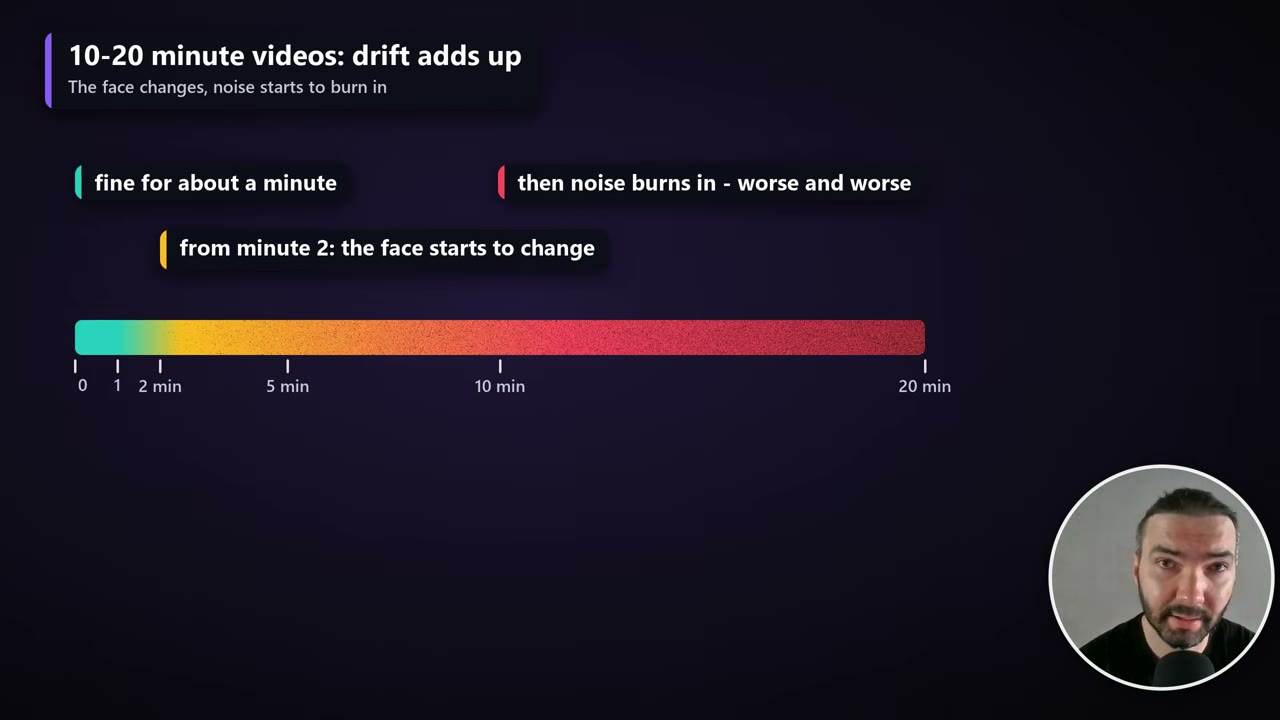
Continuation has its own problem, though. It stays stable for about 40–70 seconds; after that, the face starts to change and noise builds up, getting worse and worse over a 10- or 20-minute video.
So the workflows force a restart from the original portrait every 40–60 seconds. The restarts are planned from the whole voiceover before rendering starts, and each one goes in the middle of a real pause (at least 0.4 seconds of near-silence), so the mouth is shut on both sides of the cut. It looks a little like a quick cut back to the portrait.
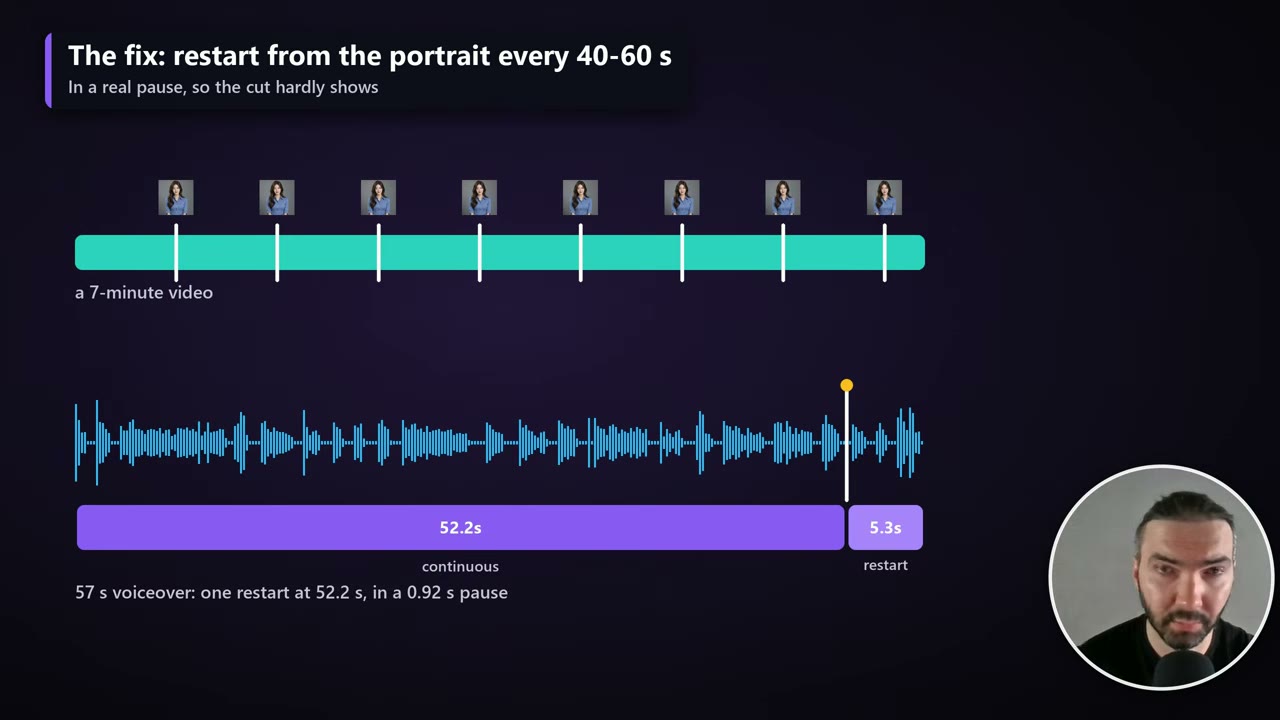
The plan is printed in the log and saved as output/longcat_longform/<name>/restart_plan.txt.
Render
Queue the workflow and watch the console. Loading the model takes a few minutes every time, so the first chunk is the slow one. After that it’s a few minutes per 3-second chunk, which is how one minute of video ends up taking about an hour.
Each queue item renders the next unfinished chunk. The template’s README says to set the batch count to at least the voiceover’s length in seconds ÷ 3.2, plus a margin; surplus items are skipped in milliseconds.
- Chunks are saved in
output/longcat_longform/<voiceover name>/. - If the job is interrupted, queue it again and it picks up from the last finished chunk.
- When it’s done, the full video is assembled in
ComfyUI/output/. Right-click it in JupyterLab to download.
The one setting worth changing
The workflows have plenty of notes, and they work as they are; I don’t recommend changing much. The exception is the restart spacing: restart_min_seconds and restart_max_seconds on the Split node (40 and 60 by default).
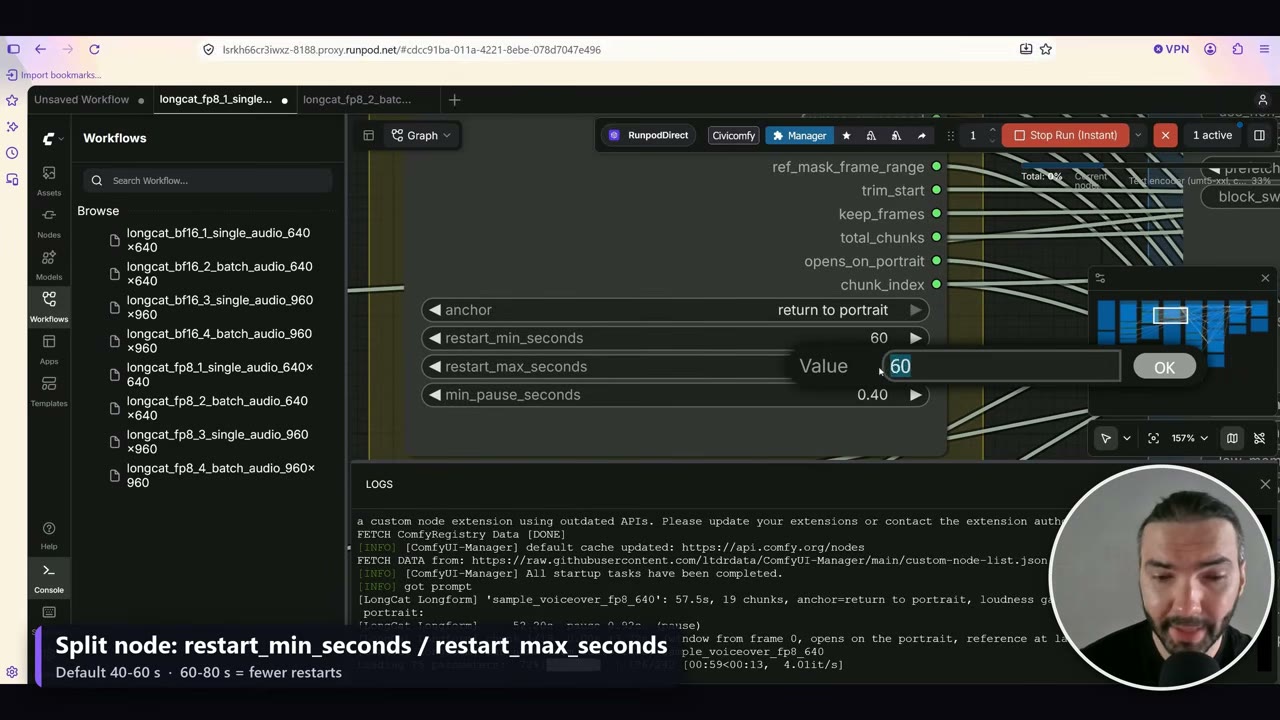
With 60–80 seconds, the workflow looks for a pause in that range instead, so there are fewer cuts back to the portrait.
When you’re done
Stop the pod when the render is finished. Your models, inputs and outputs stay on the volume. When the project is over, delete the volume too, or it keeps billing.
Mistakes to avoid
- Picking a GPU by VRAM only. The plain RTX PRO 4500 has 32 GB of VRAM but only 30 GB of RAM; pick the SE version or a 5090.
- Using BF16 on a 32 GB card. BF16 is for 80 GB GPUs; use the FP8 workflows on smaller cards.
- A portrait without hands when you want hand movement.
- Going straight to a long job. Check the first chunk for lip sync, the face and the background.
- Forgetting the volume. A stopped pod costs little; storage bills every month.
Sign up through my RunPod referral link and you get $5–$500 in RunPod credits. Without a referral link there's no bonus. I get the same bonus and use it for compute.
Watch the video version (10:27)
Everything above is in the video too, if you'd rather follow along on screen.
FAQ
How much does a minute of LongCat talking-avatar video cost?
In my runs (October 2026 prices): about $4.02 on an H100 SXM at 960 × 960 with the BF16 model, about $1.97 on an RTX PRO 4500 at 960 × 960 with FP8, and about $1.03 on an RTX PRO 4500 at 640 × 640 with FP8.
How long does LongCat take to render a minute of video?
About an hour on an H100, about 2.7 hours on an RTX PRO 4500 at 960 × 960, and about 1.4 hours on an RTX PRO 4500 at 640 × 640.
How much VRAM and RAM does LongCat need?
At least 32 GB of VRAM with the FP8 model, plus 60 GB or more of system RAM. With only 30 GB of RAM the model reloads for every chunk, which is far slower and can stall the render completely.
Why does the video cut back to the portrait every minute or so?
LongCat continues each chunk from the previous one, which looks seamless but drifts over long videos. The workflows restart from the portrait every 40–60 seconds, in the middle of a real pause, to keep the face true.
Can I run LongCat locally instead of on RunPod?
Yes, if you have the GPU and RAM. Everything is on GitHub; ask Claude or another AI to fetch the files and install them in the order of setup.sh.

Anton Tenitsky is a 3D artist with 15+ years in computer graphics, working with Nickelodeon, Gameloft, Marvel Rivals and many other clients. More about me